|
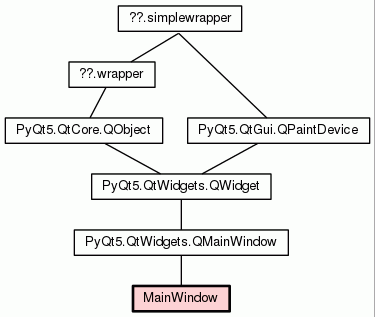
| Class Hierarchy for MainWindow |
| Home | Trees | Indices | Help |
|---|
|
|
PyQt5.QtWidgets.QMainWindow --+
                              |
                             MainWindow
The main window of the GUI.
|
|
| Class Hierarchy for MainWindow |
|
|||
|
|||
|
|||
|
|||
|
|||
|
|||
|
|||
|
|||
|
|||
| list |
|
||
|
|||
|
|||
|
|||
|
|||
|
|||
|
|||
|
|||
|
|||
|
|||
|
|||
MainWindow creator. It allow the user to:
|
Create a list of every predictors name which use a given database.
|
Callback called when the user select a miner in the combo box. When a miner is selected in the miner selection combo box some settings of the miner have to be retrieved from the configuration in order to display them to the user using the set_miner_widgets_values() method. As every miners store their results (n-grams) in a database the database path and the n-gram size are retrieved from the configuration and stored into the "dbPath" and "nGramSize" instance variables.
|
Update the widgets (labels and list) displaying infos on the miner. When a miner is selected in the miner selection combo box, its config settings are retrieve from the configuration and the instance variables "dbPath", "nGramSize" and "predsUsingDb" are set. This method modify the value of the widgets displaying the informations about the miner with the above-mentioned variables. |
Update the label showing the mining operation and the progress bar. This method is a callback which is called from the miners. It update the text of the label displaying the minig operation and the value of the progress bar displaying the operation progression.
|
Callback called when the user press the "Delete database" button. The method first identify the current miner selected in the combo box using its index then create an instance of this miner and called its rm_db() method to effectively carry out the database suppression operation. Some miners modify the configuration so the config file needs to be rewrite after the operation. Here is a short description of the miners database suppression operation, please refer to their rm_db() method docstring for more informations:
|
Callback called when the user press the "MINE!" button. The method first identify the current miner selected in the combo box using its index then create an instance of this miner and called its mine() method to effectively carry out the mining operation. Some miners modify the configuration so the config file needs to be rewrite after the operation. Here is a short description of the miners mining operation, please refer to their mine() method docstring for more informations:
|
Update the input buffers and compute the suggestion. This method is called whenever one or more character(s) is/are added to or removed from the input text. It update the input left and right buffers according to the text change and then generate the suggestions for the new input context. There is three king of input text change:
Note: It correspond to a Ctrl+A then <some printable characters> or <backspace>. |
Compute and show suggestions. Request the PredictorActivator to compute the suggestions and show them in the suggestion list. |
Callback called when the input text cursor position change. There's three possible moves types:
Note: The on_input_text_change() method used to be connected to the textChanged signal of the input text widget but it is redundant because if the text change, the cursor position automatically change too. It save some operations. Bug: When selecting characters in the input field (self.inputTextEdit) the cursor position is modified and induce erroneous context changes and word predictions. |
Complete the input with the selected suggestion. When the user double click on a word of the list the word is used to complete the input text. There is two kind of completion depending on the input cursor position:
During this method the input text widget signals are disconnected which means that no suggestions will be compute during the completion process. This is important because this method will modify the input text but, of course, there is no need to generate any suggestions as the user isn't typing anything during the process.
Note: A token can be a word or a separator. If it is a word then the completion represents the end of the word. If it is a separator then the completion represents the next word. |
| Home | Trees | Indices | Help |
|---|
| Generated by Epydoc 3.0.1 on Tue Jun 16 23:30:30 2015 | http://epydoc.sourceforge.net |