| Home | Trees | Indices | Help |
|
|---|
|
|
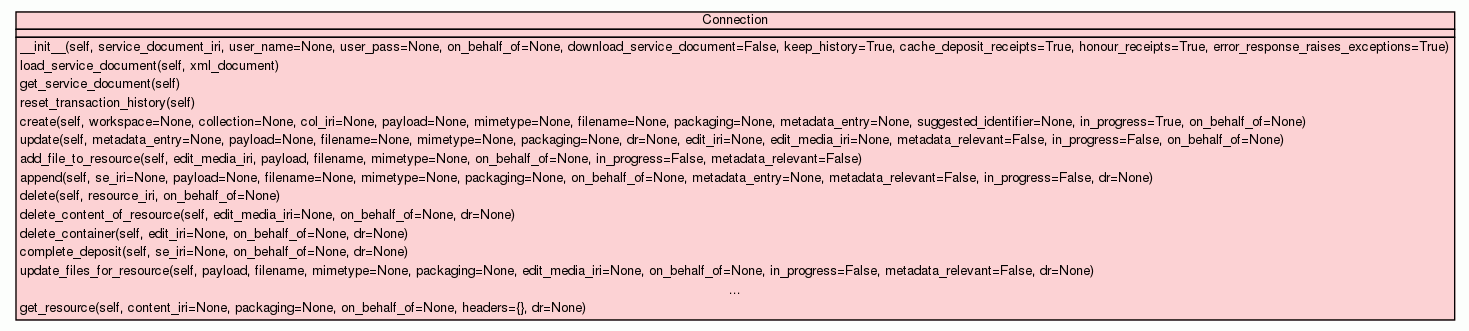
`Connection` - SWORD2 client

This connection is predicated on having a Service Document (SD), preferably by an instance being constructed with
the Service Document IRI (SD-IRI) which can dereference to the XML document itself.


Contructor parameters:

There are a number of flags that can be set when getting an instance of this class that affect the behaviour
of the client. See the help for `self.__init__` for more details.

Example usage:

>>> from sword2 import Connection
>>> conn = Connection("http://example.org/service-doc")  # An SD-IRI is required.


# Get, validate and parse the document at the SD_IRI:
>>> conn.get_service_document()

# Load a Service Document from a string:
>>> conn.load_service_document(xml_service_doc)
2011-05-30 01:06:13,251 - sword2.service_document - INFO - Initial SWORD2 validation checks on service document - Valid document? True

# View transaction history (if enabled)
>>> print conn.history.to_pretty_json()
[
 {
  "sd_iri": "http://example.org/service-doc",
  "timestamp": "2011-05-30T01:05:54.071042",
  "on_behalf_of": null,
  "type": "init",
  "user_name": null
 },
 {
  "IRI": "http://example.org/service-doc",
  "valid": true,
  "sword_version": "2.0",
  "duration": 0.0029349327087402344,
  "timestamp": "2011-05-30T01:06:13.253907",
  "workspaces_found": [
   "Main Site",
   "Sub-site"
  ],
  "type": "SD Parse",
  "maxUploadSize": 16777216
 }
]

# Start a connection and do not maintain a transaction history
# Useful for bulk-testing where the history might grow exponentially
>>> conn = Connection(...... , keep_history=False, ....)

# Initialise a connection and get the document at the SD IRI:
# (Uses the Simple Sword Server as an endpoint - sss.py

>>> from sword2 import Connection
>>> c = Connection("http://localhost:8080/sd-uri", download_service_document=True)
2011-05-30 02:04:24,179 - sword2.connection - INFO - keep_history=True--> This instance will keep a JSON-compatible transaction log of all (SWORD/APP) activities in 'self.history'
2011-05-30 02:04:24,215 - sword2.connection - INFO - Received a document for http://localhost:8080/sd-uri
2011-05-30 02:04:24,216 - sword2.service_document - INFO - Initial SWORD2 validation checks on service document - Valid document? True
>>> print c.history
--------------------
Type: 'init' [2011-05-30T02:04:24.180182]
Data:
user_name:   None
on_behalf_of:   None
sd_iri:   http://localhost:8080/sd-uri
--------------------
Type: 'SD_IRI GET' [2011-05-30T02:04:24.215661]
Data:
sd_iri:   http://localhost:8080/sd-uri
response:   {'status': '200', 'content-location': 'http://localhost:8080/sd-uri', 'transfer-encoding': 'chunked', 'server': 'CherryPy/3.1.2 WSGI Server', 'date': 'Mon, 30 May 2011 01:04:24 GMT', 'content-type': 'text/xml'}
process_duration:   0.0354170799255
--------------------
Type: 'SD Parse' [2011-05-30T02:04:24.220798]
Data:
maxUploadSize:   16777216
sd_iri:   http://localhost:8080/sd-uri
valid:   True
sword_version:   2.0
workspaces_found:   ['Main Site']
process_duration:   0.00482511520386

Please see the testsuite for this class for more examples of the sorts of transactions that can be done. (tests/test_connection*.py)
|
|||
|
|||
|
|||
|
|||
|
|||
|
|||
|
|||
|
|||
|
|||
|
|||
|
|||
|
|||
|
|||
|
|||
|
|||
|
|||
|
|||
|
|||
|
|||
|
|||
|
|||
|
|||
|
Inherited from |
|||
|
|||
|
Inherited from |
|||
|
|||
Creates a new Connection object.

Parameters:

     Connection(service_document_iri,       <--- REQUIRED - use a dummy string here if the SD is local only.

                # OPTIONAL parameters (default values are shown below)

                # Authentication parameters:   (can use any method that `httplib2` provides)

                user_name=None,
                user_pass=None,

                # Set the SWORD2 On Behalf Of value here, for it to be included as part of every transaction
                # Can be passed to every transaction method (update resource, delete deposit, etc) otherwise

                on_behalf_of=None,

                ## Behaviour Flags
                # Try to GET the service document from the provided SD-IRI in `service_document_iri` if True

                download_service_document = False,   # Don't automagically GET the SD_IRI by default

                # Keep a history of all transactions made with the SWORD2 Server
                # Records details like the response headers, sent headers, times taken and so forth
                # Kept in a `sword2.transaction_history:Transaction_History` object but can be treated like an ordinary `list`
                keep_history=True,

                # Keep a cache of all deposit receipt responses from the server and provide an 'index' to these `sword2.Deposit_Receipt` objects
                # by Edit-IRI, Content-IRI and Sword-Edit-IRI. (ie given an Edit-IRI, find the deposit receipt for the last received response containing
                # that IRI.
                # If the following flag, `honour_receipts` is set to True, packaging checks and other limits set in these receipts will be
                # honoured.
                # For example, a request for an item with an invalid packaging type will never reach the server, but throw an exception.

                cache_deposit_receipts=True,

                # Make sure to behave as required by the SWORD2 server - not sending too large a file, not asking for invalid packaging types and so on.

                honour_receipts=True,

                # Two means of handling server error responses:
                #   If set to True - An exception will be thrown from `sword2.exceptions` (caused by any server error response w/
                #      HTTP code greater than or equal to 400)
                #   OR
                #   If set to False - A `sword2.error_document:Error_Document` object will be returned.

                error_response_raises_exceptions=True
                )

If a `Connection` is created with the parameter `download_service_document` set to `False`, then no attempt
to dereference the `service_document_iri` (SD-IRI) will be made at this stage.

To cause it to get or refresh the service document from this IRI, call `self.get_service_document()`

Loading in a locally held Service Document:

>>> conn = Connection(....)

>>> with open("service_doc.xml", "r") as f:
...     conn.load_service_document(f.read())
|
Internal method for reporting errors, behaving as the `self.raise_except` flag requires. `self.raise_except` can be altered at any time to affect this methods behaviour. |
Catch a number of general HTTP error responses from the server, based on HTTP code

401 - Unauthorised.
    Will throw a `sword2.exceptions.NotAuthorised` exception, if exceptions are set to be on.
    Otherwise will return a `sword2.Error_Document` (likewise for the rest of these)

403 - Forbidden.
    Will throw a `sword2.exceptions.Forbidden` exception

404 - Not Found.
    Will throw a `sword2.exceptions.NotFound` exception

408 - Request Timeout
    Will throw a `sword2.exceptions.RequestTimeOut` exception

500-599 errors:
    Will throw a general `sword2.exceptions.ServerError` exception

4XX not listed:
    Will throw a general `sword2.exceptions.HTTPResponseError` exception
|
Method for storing the deposit receipts, and also for providing lookup dictionaries that
reference these objects.

(only provides cache if `self.keep_cache` is `True` [via the `cache_deposit_receipts` init parameter flag])

Provides and maintains:
    self.edit_iris -- a `dict`, keys: Edit-IRI hrefs, values: `sword2.Deposit_Receipt` objects they appear in

    self.cont_iris -- a `dict`, keys: Content-IRI hrefs, values: `sword2.Deposit_Receipt` objects they appear in

    self.se_iris -- a `dict`, keys: Sword-Edit-IRI hrefs, values: `sword2.Deposit_Receipt` objects they appear in

    self.cached_at -- a `dict`, keys: Edit-IRIs, values: timestamp when receipt was last cached.
|
Load the Service Document XML from bytestring, `xml_document`

Useful if SD-IRI is non-existant or invalid.

Will set the following convenience attributes:

    `self.sd` -- the `sword2.ServiceDocument` instance

    `self.workspaces` -- a `list` of workspace tuples, of the form:
                    ('Workspace atom:title', [<`sword2.Collection` object>, ....]),

    `self.maxUploadSize` -- the maximum filesize for a deposit, if given in the service document
|
Performs an HTTP request, as defined by the parameters. This is an internally used method and it is best that it
is not called directly.

target_iri -- IRI that will be the target of the HTTP call

# File upload parameters:
payload   - the payload to send. Can be either a bytestring or a File-like object that supports `payload.read()`
mimetype  - MIMEType of the payload
filename  - filename. Most SWORD2 uploads have this as being mandatory.
packaging - the SWORD2 packaging type of the payload.
            eg packaging = 'http://purl.org/net/sword/package/Binary'

# NB to work around a possible bug in httplib2 0.6.0, the file-like object is read into memory rather than streamed
# from disc, so is not as efficient as it should be. That said, it is recommended that file handles are passed to
# the _make_request method, as this is hoped to be a temporary situation.

metadata_entry  - a `sword2.Entry` to be uploaded with metadata fields set as desired.

# If there is both a payload and a metadata_entry, then the request will be made as a Multipart-related request
# Otherwise, it will be a normal request for whicever type of upload.

empty   - a flag to specify that an empty request should be made. A blank body and a 'Content-Length:0' header will be explicitly added
          and any payload or metadata_entry passed in will be ignored.


# Header flags:
suggested_identifier    -- set the 'Slug' header
in_progress             --         'In-Progress'
on_behalf_of            --         'On-Behalf-Of'
metadata_relevant       --         'Metadata-Relevant'

# HTTP settings:
method          -- "GET", "POST", etc
request_type    -- A label to be used in the transaction history for this particular operation.

Response:

A `sword2.Deposit_Receipt` object containing the deposit receipt data. If the response was blank or
not a Deposit Response, then only a few attributes will be populated:

`code` -- HTTP code of the response
`response_headers`  -- `dict` of the reponse headers
`content`  --  (Optional) in case the response body is not empty but the response is not a Deposit Receipt

If exception-throwing is turned off (`error_response_raises_exceptions = False` or `self.raise_except = False`)
then the response will be a `sword2.Error_Document`, but will still have the aforementioned attributes set, (code,
response_headers, etc)
|
Creating a Resource
===================

#BETASWORD2URL
See 6.3 Creating a Resource http://sword-app.svn.sourceforge.net/viewvc/sword-app/spec/trunk/SWORDProfile.html?revision=HEAD#protocoloperations_creatingresource

Basic parameters:

This method can create a new resource in a Collection on a SWORD2 server, given suitable authentication to do so.

Select a collection to send a request to by either:

    setting the param `col_iri` to its Collection-IRI or Col-IRI

        or

    setting 'workspace' and 'collection' to the labels for the desired workspace and collection.

SWORD2 request parameters:

    `suggested_identifier`              -- the suggested identifier of this resource (HTTP header of 'Slug'),

    `in_progress` (`True` or `False`)   -- whether or not the deposit should be considered by the
                                           server to be in progress ('In-Progress')
    `on_behalf_of`                      -- if this is a mediated deposit ('On-Behalf-Of')
                                           (the client-wide setting `self.on_behalf_of will be used otherwise)


1. "Binary File Deposit in a given Collection"
----------------------------------------------

Set the following parameters in addition to the basic parameters:

    `payload`   - the payload to send. Can be either a bytestring or a File-like object that supports `payload.read()`
    `mimetype`  - MIMEType of the payload
    `filename`  - filename. Most SWORD2 uploads have this as being mandatory.
    `packaging` - the SWORD2 packaging type of the payload.
                    eg packaging = 'http://purl.org/net/sword/package/Binary'

Response:

A `sword2.Deposit_Receipt` object containing the deposit receipt data. If the response was blank or
not a Deposit Response, then only a few attributes will be populated:

    `code` -- HTTP code of the response
    `response_headers`  -- `dict` of the reponse headers
    `content`  --  (Optional) in case the response body is not empty but the response is not a Deposit Receipt

If exception-throwing is turned off (`error_response_raises_exceptions = False` or `self.raise_except = False`)
then the response will be a `sword2.Error_Document`, but will still have the aforementioned attributes set, (code,
response_headers, etc)

2. "Creating a Resource with an Atom Entry"
-------------------------------------------

create a container within a SWORD server and optionally provide it with metadata without adding any binary content to it.

Set the following parameters in addition to the basic parameters:

    `metadata_entry`  - An instance of `sword2.Entry`, set with the metadata required.

for example:
    # conn = `sword2.Connection`, collection_iri = Collection-IRI
    >>> from sword2 import Entry
    >>> entry = Entry(title = "My new deposit",
    ...               id = "foo:id",
    ...               dcterms_abstract = "My Thesis",
    ...               dcterms_author = "Me",
    ...               dcterms_issued = "2009")

    >>> conn.create(col_iri = collection_iri,
    ...                      metadata_entry = entry,
    ...                      in_progress = True)
    # likely to want to add the thesis files later for example but get the identifier for the deposit now

Response:

A `sword2.Deposit_Receipt` object containing the deposit receipt data. If the response was blank or
not a Deposit Response, then only a few attributes will be populated:

    `code` -- HTTP code of the response
    `response_headers`  -- `dict` of the reponse headers
    `content`  --  (Optional) in case the response body is not empty but the response is not a Deposit Receipt

If exception-throwing is turned off (`error_response_raises_exceptions = False` or `self.raise_except = False`)
then the response will be a `sword2.Error_Document`, but will still have the aforementioned attributes set, (code,
response_headers, etc)

3. "Creating a Resource with a Multipart Deposit"
-------------------------------------------------

Create a resource in a given collection by uploading a file AND the metadata about this resource.

To make this sort of request, just set the parameters as shown for both the binary upload and the metadata upload.

eg:

    >>> conn.create(col_iri = collection_iri,
    ...                      metadata_entry = entry,
    ...                      payload = open("foo.zip", "r"),
    ...                      mimetype =
                .... and so on

Response:

A `sword2.Deposit_Receipt` object containing the deposit receipt data. If the response was blank or
not a Deposit Response, then only a few attributes will be populated:

    `code` -- HTTP code of the response
    `response_headers`  -- `dict` of the reponse headers
    `content`  --  (Optional) in case the response body is not empty but the response is not a Deposit Receipt

If exception-throwing is turned off (`error_response_raises_exceptions = False` or `self.raise_except = False`)
then the response will be a `sword2.Error_Document`, but will still have the aforementioned attributes set, (code,
response_headers, etc)

(under the hood, this request uses Atom Multipart-related)

From the spec:

"In order to ensure that all SWORD clients and servers can exchange a full range of file content and metadata, the use of Atom Multipart [AtomMultipart] is permitted to combine a package (possibly a simple ZIP) with a set of Dublin Core metadata terms [DublinCore] embedded in an Atom Entry.

The SWORD server is not required to support packaging formats, but this profile RECOMMENDS that the server be able to accept a ZIP file as the Media Part of an Atom Multipart request (See Section 5: IRIs and Section 7: Packaging for more details)."
|
Replacing the Metadata and/or Files of a Resource

#BETASWORD2URL
See http://sword-app.svn.sourceforge.net/viewvc/sword-app/spec/trunk/SWORDProfile.html?revision=HEAD#protocoloperations_editingcontent_multipart

Replace the metadata and/or files of a resource.

This wraps a number of methods and relies on being passed the Deposit Receipt, as the target IRI changes depending
on whether the metadata, the files or both are to be updated by the request.

This method has the same functionality as the following methods:
    update_files_for_resource
    update_metadata_for_resource
    update_metadata_and_files_for_resource

Usage:
------

Set the target for this request:
--------------------------------

You MUST pass back the `sword2.Deposit_Receipt` object you got from a previous transaction as the `dr` parameter,
and the correct IRI will automatically be chosen based on what combination of files you want to upload.

Then, add in the metadata and/or file information as desired:
-------------------------------------------------------------

File information requires:

    `payload`   - the payload to send. Can be either a bytestring or a File-like object that supports `payload.read()`
    `mimetype`  - MIMEType of the payload
    `filename`  - filename. Most SWORD2 uploads have this as being mandatory.
    `packaging` - the SWORD2 packaging type of the payload.
                    eg packaging = 'http://purl.org/net/sword/package/Binary'

    `metadata_relevant` - This should be set to `True` if the server should consider the file a potential source of metadata extraction,
                          or `False` if the server should not attempt to extract any metadata from the deposi

Metadata information requires:

    `metadata_entry`  - An instance of `sword2.Entry`, set with the metadata required.

for example, to create a metadata entry
    >>> from sword2 import Entry
    >>> entry = Entry(title = "My new deposit",
    ...               id = "new:id",    # atom:id
    ...               dcterms_abstract = "My Thesis",
    ...               dcterms_author = "Ben",
    ...               dcterms_issued = "2010")

Response:

A `sword2.Deposit_Receipt` object containing the deposit receipt data. If the response was blank or
not a Deposit Response, then only a few attributes will be populated:

    `code` -- HTTP code of the response
    `response_headers`  -- `dict` of the reponse headers
    `content`  --  (Optional) in case the response body is not empty but the response is not a Deposit Receipt

If exception-throwing is turned off (`error_response_raises_exceptions = False` or `self.raise_except = False`)
then the response will be a `sword2.Error_Document`, but will still have the aforementioned attributes set, (code,
response_headers, etc)
|
Adding Files to the Media Resource

From the spec, paraphrased:

    "This feature is for use when clients wish to send individual files to the server and to receive back the IRI for the created resource. [Adding new items to the deposit container] will not give back the location of the deposited resources, so in cases where the server does not provide the (optional) Deposit Receipt, it is not possible for the client to ascertain the location of the file actually deposited - the Location header in that operation is the Edit-IRI. By POSTing to the EM-IRI, the Location header will return the IRI of the deposited file itself, rather than that of the container.

As the EM-IRI represents the Media Resource itself, rather than the Container, this operation will not formally support metadata handling, and therefore also offers no explicit support for packaging either since packages may be both content and metadata. Nonetheless, for files which may contain extractable metadata, there is a Metadata-Relevant header which can be defined to indicate whether the deposit can be used to augment the metadata of the container."

#BETASWORD2URL
See http://sword-app.svn.sourceforge.net/viewvc/sword-app/spec/trunk/SWORDProfile.html?revision=HEAD#protocoloperations_addingcontent_mediaresource


Set the following parameters in addition to the basic parameters:

    `edit_media_iri` - The Edit-Media-IRI

    `payload`   - the payload to send. Can be either a bytestring or a File-like object that supports `payload.read()`
    `mimetype`  - MIMEType of the payload
    `filename`  - filename. Most SWORD2 uploads have this as being mandatory.
    `packaging` - the SWORD2 packaging type of the payload.
                    eg packaging = 'http://purl.org/net/sword/package/Binary'

Response:

A `sword2.Deposit_Receipt` object containing the deposit receipt data. If the response was blank or
not a Deposit Response, then only a few attributes will be populated:

    `code` -- HTTP code of the response
    `response_headers`  -- `dict` of the reponse headers
    `content`  --  (Optional) in case the response body is not empty but the response is not a Deposit Receipt

If exception-throwing is turned off (`error_response_raises_exceptions = False` or `self.raise_except = False`)
then the response will be a `sword2.Error_Document`, but will still have the aforementioned attributes set, (code,
response_headers, etc)
|
Adding Content to a Resource

#BETASWORD2URL
See http://sword-app.svn.sourceforge.net/viewvc/sword-app/spec/trunk/SWORDProfile.html?revision=HEAD#protocoloperations_addingcontent

Usage:
------

Set the target for this request:
--------------------------------

Set `se_iri` to be the SWORD2-Edit-IRI for a given deposit. (This can be found in `sword2.Deposit_Receipt.se_iri`)


    OR

you can pass back the `sword2.Deposit_Receipt` object you got from a previous transaction as the `dr` parameter,
and the correct IRI will automatically be chosen.

Then:
-----

1. "Adding New Packages or Files to a Container"
------------------------------------------------

Set the following parameters in addition to the basic parameters:

    `payload`   - the payload to send. Can be either a bytestring or a File-like object that supports `payload.read()`
    `mimetype`  - MIMEType of the payload
    `filename`  - filename. Most SWORD2 uploads have this as being mandatory.
    `packaging` - the SWORD2 packaging type of the payload.
                    eg packaging = 'http://purl.org/net/sword/package/Binary'

Response:

A `sword2.Deposit_Receipt` object containing the deposit receipt data. If the response was blank or
not a Deposit Response, then only a few attributes will be populated:

    `code` -- HTTP code of the response
    `response_headers`  -- `dict` of the reponse headers
    `content`  --  (Optional) in case the response body is not empty but the response is not a Deposit Receipt

If exception-throwing is turned off (`error_response_raises_exceptions = False` or `self.raise_except = False`)
then the response will be a `sword2.Error_Document`, but will still have the aforementioned attributes set, (code,
response_headers, etc)


2. "Adding New Metadata to a Container"
---------------------------------------

NB SWORD2 does not instruct the server on the best way to handle metadata, only that metadata SHOULD be
added and not overwritten; in certain circumstances this may not produce the desired behaviour.

Set the following parameters in addition to the basic parameters:

    `metadata_entry`  - An instance of `sword2.Entry`, set with the metadata required.

for example:
    # conn = `sword2.Connection`, se_iri = SWORD2-Edit-IRI
    >>> from sword2 import Entry
    >>> entry = Entry(dcterms:identifier = "doi://......")
    >>> conn.add_new_item_to_container(se_iri = se_iri,
    ...                                metadata_entry = entry)

Response:

A `sword2.Deposit_Receipt` object containing the deposit receipt data. If the response was blank or
not a Deposit Response, then only a few attributes will be populated:

    `code` -- HTTP code of the response
    `response_headers`  -- `dict` of the reponse headers
    `content`  --  (Optional) in case the response body is not empty but the response is not a Deposit Receipt

If exception-throwing is turned off (`error_response_raises_exceptions = False` or `self.raise_except = False`)
then the response will be a `sword2.Error_Document`, but will still have the aforementioned attributes set, (code,
response_headers, etc)

3. "Adding New Metadata and Packages or Files to a Container with Multipart"
----------------------------------------------------------------------------

Create a resource in a given collection by uploading a file AND the metadata about this resource.

To make this sort of request, just set the parameters as shown for both the binary upload and the metadata upload.

eg:

    >>> conn.add_new_item_to_container(se_iri = se_iri,
    ...                      metadata_entry = entry,
    ...                      payload = open("foo.zip", "r"),
    ...                      mimetype =
                .... and so on

Response:

A `sword2.Deposit_Receipt` object containing the deposit receipt data. If the response was blank or
not a Deposit Response, then only a few attributes will be populated:

    `code` -- HTTP code of the response
    `response_headers`  -- `dict` of the reponse headers
    `content`  --  (Optional) in case the response body is not empty but the response is not a Deposit Receipt

If exception-throwing is turned off (`error_response_raises_exceptions = False` or `self.raise_except = False`)
then the response will be a `sword2.Error_Document`, but will still have the aforementioned attributes set, (code,
response_headers, etc)
|
Delete resource Generic method to send an HTTP DELETE request to a given IRI. Can be given the optional parameter of `on_behalf_of`. |
Deleting the Content of a Resource

Remove all the content of a resource without removing the resource itself

#BETASWORD2URL
See http://sword-app.svn.sourceforge.net/viewvc/sword-app/spec/trunk/SWORDProfile.html?revision=HEAD#protocoloperations_deletingcontent

Usage:
------

Set the target for this request:
--------------------------------

Set `edit_media_iri` to be the Edit-Media-IRI for a given resource.


    OR

you can pass back the `sword2.Deposit_Receipt` object you got from a previous transaction as the `dr` parameter,
and the correct IRI will automatically be chosen.
|
Deleting the Container

Delete the entire object on the server, effectively removing the deposit entirely.

#BETASWORD2URL
See http://sword-app.svn.sourceforge.net/viewvc/sword-app/spec/trunk/SWORDProfile.html?revision=HEAD#protocoloperations_deleteconteiner

Usage:
------

Set the target for this request:
--------------------------------

Set `edit_iri` to be the Edit-IRI for a given resource.


    OR

you can pass back the `sword2.Deposit_Receipt` object you got from a previous transaction as the `dr` parameter,
and the correct IRI will automatically be chosen.
|
Completing a Previously Incomplete Deposit

Use this method to indicate to a server that a deposit which was 'in progress' is now complete. In other words, complete a deposit
which had the 'In-Progress' flag set to True.

#BETASWORD2URL
http://sword-app.svn.sourceforge.net/viewvc/sword-app/spec/trunk/SWORDProfile.html?revision=HEAD#continueddeposit_complete

Usage:
------

Set the target for this request:
--------------------------------

Set `se_iri` to be the SWORD2-Edit-IRI for a given resource.


    OR

you can pass back the `sword2.Deposit_Receipt` object you got from a previous transaction as the `dr` parameter,
and the correct IRI will automatically be chosen.
|
Replacing the File Content of a Resource

#BETASWORD2URL
See http://sword-app.svn.sourceforge.net/viewvc/sword-app/spec/trunk/SWORDProfile.html?revision=HEAD#protocoloperations_editingcontent_binary

The `Connection` can replace the file content of a resource, given the Edit-Media-IRI for this resource. This can be found
from the `sword2.Deposit_Receipt.edit_media` attribute of a previous deposit, or directly from the deposit receipt XML response.

Usage:
------

Set the target for this request:
--------------------------------

Set the `edit_media_iri` parameter to the Edit-Media-IRI.

    OR

you can pass back the `sword2.Deposit_Receipt` object you got from a previous transaction as the `dr` parameter,
and the correct IRI will automatically be chosen.

Then, add in the payload:
-------------------------

Set the following parameters in addition to the basic parameters (see `self.create_resource`):

    `payload`   - the payload to send. Can be either a bytestring or a File-like object that supports `payload.read()`
    `mimetype`  - MIMEType of the payload
    `filename`  - filename. Most SWORD2 uploads have this as being mandatory.
    `packaging` - the SWORD2 packaging type of the payload.
                    eg packaging = 'http://purl.org/net/sword/package/Binary'

    `metadata_relevant` - This should be set to `True` if the server should consider the file a potential source of metadata extraction,
                          or `False` if the server should not attempt to extract any metadata from the deposi

Response:

A `sword2.Deposit_Receipt` object containing the deposit receipt data. If the response was blank or
not a Deposit Response, then only a few attributes will be populated:

    `code` -- HTTP code of the response
    `response_headers`  -- `dict` of the reponse headers
    `content`  --  (Optional) in case the response body is not empty but the response is not a Deposit Receipt

If exception-throwing is turned off (`error_response_raises_exceptions = False` or `self.raise_except = False`)
then the response will be a `sword2.Error_Document`, but will still have the aforementioned attributes set, (code,
response_headers, etc)
|
Replacing the Metadata of a Resource

#BETASWORD2URL
See http://sword-app.svn.sourceforge.net/viewvc/sword-app/spec/trunk/SWORDProfile.html?revision=HEAD#protocoloperations_editingcontent_metadata

Replace the metadata of a resource as identified by its Edit-IRI.

Note, from the specification: "The client can only be sure that the server will support this process when using the default format supported by SWORD: Qualified Dublin Core XML embedded directly in the atom:entry. Other metadata formats MAY be supported by a particular server, but this is not covered by the SWORD profile"

Usage:
------

Set the target for this request:
--------------------------------

Set the `edit_iri` parameter to the Edit-IRI.

    OR

you can pass back the `sword2.Deposit_Receipt` object you got from a previous transaction as the `dr` parameter,
and the correct IRI will automatically be chosen.

Then, add in the metadata:
--------------------------

Set the following in addition to the basic parameters:

    `metadata_entry`  - An instance of `sword2.Entry`, set with the metadata required.

for example, to replace the metadata for a given:
    # conn = `sword2.Connection`, edit_iri = Edit-IRI

    >>> from sword2 import Entry
    >>> entry = Entry(title = "My new deposit",
    ...               id = "new:id",    # atom:id
    ...               dcterms_abstract = "My Thesis",
    ...               dcterms_author = "Ben",
    ...               dcterms_issued = "2010")

    >>> conn.update_metadata_for_resource(edit_iri = edit_iri,
    ...                                   metadata_entry = entry)


Response:

A `sword2.Deposit_Receipt` object containing the deposit receipt data. If the response was blank or
not a Deposit Response, then only a few attributes will be populated:

    `code` -- HTTP code of the response
    `response_headers`  -- `dict` of the reponse headers
    `content`  --  (Optional) in case the response body is not empty but the response is not a Deposit Receipt

If exception-throwing is turned off (`error_response_raises_exceptions = False` or `self.raise_except = False`)
then the response will be a `sword2.Error_Document`, but will still have the aforementioned attributes set, (code,
response_headers, etc)
|
Replacing the Metadata and Files of a Resource

#BETASWORD2URL
See http://sword-app.svn.sourceforge.net/viewvc/sword-app/spec/trunk/SWORDProfile.html?revision=HEAD#protocoloperations_editingcontent_multipart

Replace the metadata and files of a resource as identified by its Edit-IRI.

Usage:
------

Set the target for this request:
--------------------------------

Set the `edit_iri` parameter to the Edit-IRI.

    OR

you can pass back the `sword2.Deposit_Receipt` object you got from a previous transaction as the `dr` parameter,
and the correct IRI will automatically be chosen.

Then, add in the file and metadata information:
-----------------------------------------------
Set the following in addition to the basic parameters:

File information:

    `payload`   - the payload to send. Can be either a bytestring or a File-like object that supports `payload.read()`
    `mimetype`  - MIMEType of the payload
    `filename`  - filename. Most SWORD2 uploads have this as being mandatory.
    `packaging` - the SWORD2 packaging type of the payload.
                    eg packaging = 'http://purl.org/net/sword/package/Binary'

    `metadata_relevant` - This should be set to `True` if the server should consider the file a potential source of metadata extraction,
                          or `False` if the server should not attempt to extract any metadata from the deposi

Metadata information:

    `metadata_entry`  - An instance of `sword2.Entry`, set with the metadata required.

for example, to create a metadata entry
    >>> from sword2 import Entry
    >>> entry = Entry(title = "My new deposit",
    ...               id = "new:id",    # atom:id
    ...               dcterms_abstract = "My Thesis",
    ...               dcterms_author = "Ben",
    ...               dcterms_issued = "2010")

Response:

A `sword2.Deposit_Receipt` object containing the deposit receipt data. If the response was blank or
not a Deposit Response, then only a few attributes will be populated:

    `code` -- HTTP code of the response
    `response_headers`  -- `dict` of the reponse headers
    `content`  --  (Optional) in case the response body is not empty but the response is not a Deposit Receipt

If exception-throwing is turned off (`error_response_raises_exceptions = False` or `self.raise_except = False`)
then the response will be a `sword2.Error_Document`, but will still have the aforementioned attributes set, (code,
response_headers, etc)
|
Getting the Sword Statement. IN PROGRESS - USE AT OWN RISK.... see `sword2.Sword_Statement`. |
Retrieving the content

Get the file or package from the SWORD2 server.

From the specification:
    "The Deposit Receipt contains two IRIs which can be used to retrieve content from the server: Cont-IRI and EM-IRI. These are provided in the atom:content@src element and the atom:link@rel="edit-media" elements respectively. Their only functional difference is that the client MUST NOT carry out any HTTP operations other than GET on the Cont-IRI, while all operations are permitted on the EM-IRI. It is acceptable, but not required, that both IRIs to be the same, and in this section we refer only to the EM-IRI but in all cases it can be substituted for the Cont-IRI."

#BETASWORD2URL
See http://sword-app.svn.sourceforge.net/viewvc/sword-app/spec/trunk/SWORDProfile.html?revision=HEAD#protocoloperations_retrievingcontent

Usage:
------

Set the target for this request:
--------------------------------

Set `content_iri` to be the Content-IRI for a given resource (or to the IRI of any resource you wish to HTTP GET)


    OR

you can pass back the `sword2.Deposit_Receipt` object you got from a previous transaction as the `dr` parameter,
and the correct IRI will automatically be chosen.

Response:

    A `ContentWrapper` -
        `ContentWrapper.response_headers`    -- response headers
        `ContentWrapper.content` -- body of response from server (the file or package)
        `ContentWrapper.code`    -- status code ('200' on success.)
|
| Home | Trees | Indices | Help |
|
|---|
| Generated by Epydoc 3.0.1 on Thu Jun 9 07:52:48 2011 | http://epydoc.sourceforge.net |