| Home | Trees | Indices | Help |
|
|---|
|
|
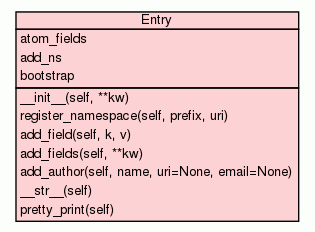
Used to create `Entry`s - for multipart/metadata submission. Has a simple and extendable way to add in
namespace-aware key-value pairs.

Example of use:

>>> from sword2 import Entry
>>> e = Entry()   # it can be opened blank, but more usefully...
>>> e = Entry(id="atom id",
              title="atom title",
              dcterms_identifier="some other id")

# Getting the bytestring document
>>> print str(e)
<?xml version="1.0"?><entry xmlns="http://www.w3.org/2005/Atom" xmlns:dcterms="http://purl.org/dc/terms/">
    <generator uri="http://bitbucket.org/beno/python-sword2" version="0.1"/>
<updated>2011-06-05T16:20:34.914474</updated><dcterms:identifier>some other id</dcterms:identifier><id>atom id</id><title>atom title</title></entry>


# Adding fields to the metadata entry
# dcterms (and other, non-atom fields) can be used by passing in a parameter with an underscore between the
# prefix and element name, eg:
>>> e.add_fields(dcterms_title= "dcterms title", dcterms_some_other_field = "other")

# atom:author field is treated slightly differently than all the other fields:
# dictionary is required
>>> e.add_fields(author={"name":"Ben", "email":"foo@example.org"})
>>> print str(e)
<?xml version="1.0"?>
<entry xmlns="http://www.w3.org/2005/Atom" xmlns:dcterms="http://purl.org/dc/terms/">
    <generator uri="http://bitbucket.org/beno/python-sword2" version="0.1"/>
    <updated>2011-06-05T16:20:34.914474</updated>
    <dcterms:identifier>some other id</dcterms:identifier>
    <id>atom id</id><title>atom title</title>
    <author>
        <name>Ben</name>
        <email>foo@example.org</email>
    </author>
    <dcterms:some_other_field>other</dcterms:some_other_field>
    <dcterms:title>dcterms title</dcterms:title>
</entry>
>>>

# Other namespaces - use `Entry.register_namespace` to add them to the list of those considered  (prefix, URL):
>>> e.register_namespace("myschema", "http://example.org")
>>> e.add_fields(myschema_foo = "bar")
>>> print str(e)
<?xml version="1.0"?><entry xmlns="http://www.w3.org/2005/Atom" xmlns:dcterms="http://purl.org/dc/terms/">
    <generator uri="http://bitbucket.org/beno/python-sword2" version="0.1"/>
    <updated>2011-06-05T16:20:34.914474</updated>
    <dcterms:identifier>some other id</dcterms:identifier>
    <id>atom id</id><title>atom title</title>
    <author>
        <name>Ben</name>
        <email>foo@example.org</email>
    </author>
    <dcterms:some_other_field>other</dcterms:some_other_field>
    <dcterms:title>dcterms title</dcterms:title>
    <myschema:foo xmlns:myschema="http://example.org">bar</myschema:foo>
</entry>

This class doesn't provide editing/updating functions as the full etree API is exposed through the
attribute 'entry'. For example:

>>> len(e.entry.getchildren())
14
|
|||
|
|||
|
|||
|
|||
|
|||
|
|||
|
|||
|
|||
|
Inherited from |
|||
|
|||
atom_fields = |
|||
add_ns = |
|||
bootstrap = |
|||
|
|||
|
Inherited from |
|||
|
|||
Create a basic `Entry` document, setting the generator and a timestamp for the updated element value. Any keyword parameters passed in will be passed to the add_fields method and added to the entry bootstrap document. It's currently not possible to add a namespace and use it within the init call.
|
Registers a namespace,, making it available for use when adding subsequent fields to the entry. Registration will also affect the XML export, adding in the xmlns:prefix="url" attribute when required. |
Append a single key-value pair to the `Entry` document. eg >>> e.add_field("myprefix_fooo", "value") It is advisable to use the `Entry.add_fields` method instead as this is neater and simplifies element entry. Note that the atom:author field is handled differently, as it requires certain fields from the author: >>> e.add_field("author", {'name':".....", 'email':"....", 'uri':"...."} ) Note that this means of entry is not supported for other elements. |
Add in multiple elements in one method call. Eg: >>> e.add_fields(dcterms_title="Origin of the Species", dcterms_contributor="Darwin, Charles") |
Export the XML to a bytestring, ready for use
|
|
|||
bootstrap
|
| Home | Trees | Indices | Help |
|
|---|
| Generated by Epydoc 3.0.1 on Thu Jun 9 07:52:48 2011 | http://epydoc.sourceforge.net |
