Class PairtreeStorageObject
source code
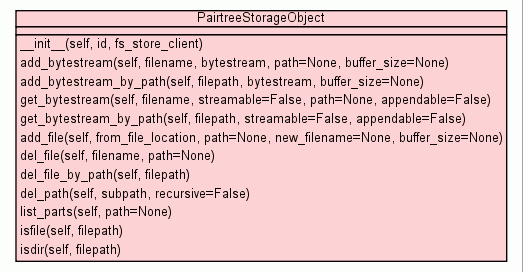
The important methods:
-
add_bytestream(filename, bytestream, path=None, buffer_size=None): -.
get_bytestream(filename, streamable=False, path=None):
-
del_file(filename, path=None):
-
list_parts(path=None):
First, setup up a simple store in 'data' and get an object called
'bar' (which will be equivalent to 'http://example.org/bar')
>>> from pairtree import PairtreeStorageFactory
>>> factory = PairtreeStorageFactory()
>>> store = factory.get_store(store_dir='data', uri_base='http://example.org/')
>>> bar = store.get_object('bar')
Now add a simple string to a file called 'foo.txt'
>>> bar.add_bytestream('foo.txt', 'can be any sequence of bytes')
>>> bar.list_parts()
['foo.txt']
>>>
Adding buffered content from a file:
>>> with open('/home/ben/Firefox_wallpaper.png','rb') as stream:
...   bar.add_bytestream('Firefox_wallpaper.png', stream)
...
>>>
Adding the same file to magic/path/inside/object - paths are
automatically created on demand.
>>> with open('/home/ben/Firefox_wallpaper.png','rb') as stream:
...   bar.add_bytestream('Firefox_wallpaper.png', stream, path='magic/path/inside/object')
...
>>>
Removing the first copy of that file, which was added to the wrong
place:
>>> bar.del_file('Firefox_wallpaper.png')
>>> bar.list_parts()
['magic', 'foo.txt']
>>> bar.list_parts('magic/path')
['inside']
>>> bar.list_parts('magic/path/inside/object')
['Firefox_wallpaper.png']
>>>
There are also some convenience methods:
The by_path suffix means that you can give it the whole path as
one, and it will try to figure out what is intended, for example,
consider the png we placed in a nested directory earlier:
>>> with open('/home/ben/Firefox_wallpaper.png','rb') as stream:
...   bar.add_bytestream('Firefox_wallpaper.png', stream, path='magic/path/inside/object')
...
This can be written as:
>>> with open('/home/ben/Firefox_wallpaper.png','rb') as stream:
...   bar.add_bytestream_by_path('magic/path/inside/object/Firefox_wallpaper.png', stream)
...
Getting files from an object
The flag streamable is key here - if this is set to True,
then you will be passed a file handle, which you must remember to close
or use the construct:
>>> with bar.get_bytestream('foo.txt', streamable=True) as text:
...   print text.read()
...
>>>
This is very useful for large files you wish to scan through, but do
not need to hold in memory all at the same time.
By setting streamable to False, the entire file is read into memory
and returned:
>>> print bar.get_bytestream('foo.txt')
can be any sequence of bytes
|
|
__init__(self,
id,
fs_store_client)
x.__init__(...) initializes x; see x.__class__.__doc__ for signature |
source code
|
|
|
|
add_bytestream(self,
filename,
bytestream,
path=None,
buffer_size=None)
Add a string or file to a given filename within this object. |
source code
|
|
|
|
|
|
|
get_bytestream(self,
filename,
streamable=False,
path=None,
appendable=False)
Reads a file from a pairtree object - If streamable is set to True,
this returns the filehandle for that file, which must be
close()'d once finished with. |
source code
|
|
|
|
|
|
|
add_file(self,
from_file_location,
path=None,
new_filename=None,
buffer_size=None)
Adds a file from a given location. |
source code
|
|
|
|
|
|
|
|
|
|
del_path(self,
subpath,
recursive=False)
Delete a subpath from the object, and can do so recursively
(optional) If the path is found to be not "empty" (ie has
not parts in it) and recursive is not True, then it will raise a PathIsNotEmptyException |
source code
|
|
|
|
|
|
|
isfile(self,
filepath)
Returns True or False depending on whether the path is a file or not. |
source code
|
|
|
|
isdir(self,
filepath)
Returns True or False depending on whether the path is a subdirectory
or not. |
source code
|
|
|
Inherited from object:
__delattr__,
__format__,
__getattribute__,
__hash__,
__new__,
__reduce__,
__reduce_ex__,
__repr__,
__setattr__,
__sizeof__,
__str__,
__subclasshook__
|
|
Inherited from object:
__class__
|
__init__(self,
id,
fs_store_client)
(Constructor)
| source code
|
x.__init__(...) initializes x; see x.__class__.__doc__ for
signature
- Parameters:
- Overrides:
object.__init__
|
add_bytestream(self,
filename,
bytestream,
path=None,
buffer_size=None)
| source code
|
Add a string or file to a given filename within this object. a
path may be supplied to store the file within a subdirectory
of the object.
- Parameters:
path (Directory path) - (Optional) subdirectory path to store file infilename (filename) - Name of the file to write tobytestream (str|file) - Either a string or a file-like object to read frombuffer_size (int) - (Optional) Used for streaming filelike objects - defines the size
of the buffer to read in each cycle.
|
add_bytestream_by_path(self,
filepath,
bytestream,
buffer_size=None)
| source code
|
Add a string or file to a given filename within this object.
The following adds the contents of footxt into a file 'foo.txt' in a
subdirectory of the object 'data', which may or may not have existed
prior to this call:
>>> object.add_bytestream_by_path('data/foo.txt', footxt)
- Parameters:
filepath (path to a file) - (Optional) path to store the file inbytestream (str|file) - Either a string or a file-like object to read frombuffer_size (int) - (Optional) Used for streaming filelike objects - defines the size
of the buffer to read in each cycle.
|
get_bytestream(self,
filename,
streamable=False,
path=None,
appendable=False)
| source code
|
Reads a file from a pairtree object - If streamable is set to True,
this returns the filehandle for that file, which must be
close()'d once finished with. In python 2.6 and above, this
can be done easily:
>>> with object.get_bytestream('image001.tif', True, 'data/images') as stream:
        # Do something with the C{stream} handle
        pass
stream is closed at the end of a with block
If appendable is set to True, then the file is opened "wb+"
and can accept writes. Otherwise, the file is opened read-only.
- Parameters:
path (Directory path) - (Optional) subdirectory path to retrieve file fromfilename (filename) - Name of the file to read instreamable (True|False) - If True, returns a filelike handle to read() from -
remember to close() the file! If False, reads
in the file into a bytestring and return that instead. - Returns:
- Either
file or str
|
get_bytestream_by_path(self,
filepath,
streamable=False,
appendable=False)
| source code
|
As get_bytestream, but can ask for a file via a path:
>>> print object.get_bytestream('data/foo/mytext.txt')
............
- Parameters:
filepath (path to a file) - (Optional) path of the file inside the objectstreamable (True|False) - If True, returns a filelike handle to read() from -
remember to close() the file! If False, reads
in the file into a bytestring and return that instead. - Returns:
- Either
file or str
|
add_file(self,
from_file_location,
path=None,
new_filename=None,
buffer_size=None)
| source code
|
Adds a file from a given location. Currently, the copy is due via
python buffering the read from one file to the other. Might be easily
replaceable with a shutil.copy at a later date.
If no new filename is set, it will use the original filename
Aside from this, it works in the same fasion as add_bytestream
- Parameters:
from_file_location (Directory path) - File path to read the file frompath (Directory path) - (Optional) subdirectory within object to store file innew_filename (filename) - Name of the file to write tobuffer_size (int) - (Optional) Used for streaming filelike objects - defines the size
of the buffer to read in each cycle.
|
|
Delete a file from the object.
If path is set, it will attempt to delete from that subpath.
- Parameters:
filename (filename) - Name of the file to deletepath (Directory path) - (Optional) subdirectory within object to delete file from
|
|
Delete a file from the object using the filepath as a subpath within
the object.
Eg:
   object_root --  foo.txt
                   foo2.txt
                   data    --  image1.jpg
                               image2.jpg
>>> object.del_file_by_path('data/image2.jpg')
>>>
- Parameters:
filepath (Directory path) - subdirectory filepath within object to delete
|
|
Delete a subpath from the object, and can do so recursively (optional)
If the path is found to be not "empty" (ie has not parts in it)
and recursive is not True, then it will raise a PathIsNotEmptyException
- Parameters:
path (Directory path) - subdirectory path to deleterecursive (bool) - Whether the delete is recursive (think rm -rf)
|
|
List all the parts of object's root.
If path is supplied, the parts in that subdirectory are returned.
If the subpath doesn't exist, a ObjectNotFoundException will be raised.
>>> object.list_parts('data/images')
[ 'image001.tif', 'image....    ]
- Parameters:
path (Directory path) - (Optional) List the parts contained in path's
subdirectory - Returns:
list
|
|
Returns True or False depending on whether the path is a file or
not.
If the file doesn't exist, False is returned.
- Parameters:
path (Directory path) - Path to be tested - Returns:
bool
|
|
Returns True or False depending on whether the path is a subdirectory
or not.
If the path doesn't exist, False is returned.
- Parameters:
path (Directory path) - Path to be tested - Returns:
bool
|