OLAP Server
Cubes framework provides easy to install web service WSGI server with API that covers most of the Cubes logical model metadata and aggregation browsing functionality.
See also
Server Requests
Info
Request: GET /info
Return an information about the server and server’s data.
Content related keys:
- label – server’s name or label
- description – description of the served data
- copyright – copyright of the data, if any
- license – data license
- maintainer – name of the data maintainer, might be in format Name Surname <namesurname@domain.org>
- contributors - list of contributors
- keywords – list of keywords that describe the data
- related – list of related or “friendly” Slicer servers with other open data – a dictionary with keys label and url.
- visualizers – list of links to prepared visualisations of the server’s data – a dictionary with keys label and url.
Server related keys:
- authentication – authentication method, might be none, pass_parameter, http_basic_proxy or other. See Authorization and Authentication for more information
- json_record_limit - maximum number of records yielded for JSON responses
- cubes_version – Cubes framework version
Example:
{
    "description": "Some Open Data",
    "license": "Public Domain",
    "keywords": ["budget", "financial"],
    "authentication": "none",
    "json_record_limit": 1000,
    "cubes_version": "0.11.2"
}
Model
List of Cubes
Request: GET /cubes
Get list of basic informatiob about served cubes. The cube description dictionaries contain keys: name, label, description and category.
[
    {
        "name": "contracts",
        "label": "Contracts",
        "description": "...",
        "category": "..."
    }
]
Cube Model
Request: GET /cube/<name>/model
Get model of a cube name. Returned structure is a dictionary with keys:
name – cube name – used as server-wide cube identifier
label – human readable name of the cube – to be displayed to the users (localized)
description – optional textual cube description (localized)
dimensions – list of dimension description dictionaries (see below)
- aggregates – list of measures aggregates (mostly computed values) that
can be computed. Each item is a dictionary.
- measures – list of measure attributes (properties of facts). Each
item is a dictionary. Example of a measure is: amount, price.
details – list of attributes that contain fact details. Those attributes are provided only when getting a fact or a list of facts.
- info – a dictionary with additional metadata that can be used in the
front-end. The contents of this dictionary is defined by the model creator and interpretation of values is left to the consumer.
features (advanced) – a dictionary with features of the browser, such as available actions for the cube (“is fact listing possible?”)
Aggregate is the key numerical property of the cube from reporting perspective. It is described as a dictionary with keys:
- name – aggregate identifier, such as: amount_sum, price_avg, total, record_count
- label – human readable label to be displayed (localized)
- measure – measure the aggregate is derived from, if it exists or it is known. Might be empty.
- function - name of an aggregate function applied to the measure, if known. For example: sum, min, max.
- window_size – number of elements within a window for window functions such as moving average
- info – additional custom information (unspecified)
Aggregate names are used in the aggregates parameter of the /aggregate request.
Measure dictionary contains:
- name – measure identifier
- label – human readable name to be displayed (localized)
- aggregates – list of aggregate functions that are provided for this measure
- window_size – number of elements within a window for window functions such as moving average
- info – additional custom information (unspecified)
Note
Compared to previous versions of Cubes, the clients do not have to construct aggregate names (as it used to be amount``+``_sum). Clients just get the aggrergate name property and use it right away.
See more information about measures and aggregates in the /aggregate request description.
Example cube:
{
    "name": "contracts",
    "info": {},
    "label": "Contracts",
    "aggregates": [
        {
            "name": "amount_sum",
            "label": "Amount sum",
            "info": {},
            "function": "sum"
        },
        {
            "name": "record_count",
            "label": "Record count",
            "info": {},
            "function": "count"
        }
    ],

    "measures": [
        {
            "name": "amount",
            "label": "Amount",
            "info": {},
            "aggregates": [ "sum" ]
        }
    ],

    "details": [...],

    "dimensions": [...]
}
The dimension description dictionary:
- name – dimension identifier
- label – human readable dimension name (localized)
- is_flat – True if the dimension has only one level, otherwise False
- has_details – True if the dimension has more than one attribute
- default_hierarchy_name - name of default dimension hierarchy
- levels – list of level descriptions
- hierarchies – list of dimension hierarchies
- info – additional custom information (unspecified)
- cardinality – dimension cardinality
- role – dimension role (special treatment, for example time)
- category – dimension category
The level description:
- name – level identifier (within dimension context)
- label – human readable level name (localized)
- attributes – list of level’s attributes
- key – name of level’s key attribute (mostly the first attribute)
- label_attribute – name of an attribute that contains label for the level’s members (mostly the second attribute, if present)
- order_attribute – name of an attribute that the level should be ordered by (optional)
- order – order direction asc, desc or none.
- cardinality – symbolic approximation of the number of level’s members
- role – level role (special treatment)
- info – additional custom information (unspecified)
Cardinality values and their meaning:
- tiny – few values, each value can have it’s representation on the screen, recommended: up to 5.
- low – can be used in a list UI element, recommended 5 to 50 (if sorted)
- medium – UI element is a search/text field, recommended for more than 50 elements
- high – backends might refuse to yield results without explicit pagination or cut through this level.
Note
Use attribute["ref"] to access aggreegation result records. Each level (dimension) attribute description contains two properties: name and ref. name is identifier within the dimension context. The key reference ref is used for retrieving aggregation or browing results.
It is not recommended to create any dependency by parsing or constructing the ref property at the client’s side.
Aggregation and Browsing
The core data and analytical functionality is accessed through the following requests:
- /cube/<name>/aggregate – aggregate measures, provide summary, generate drill-down, slice&dice, ...
- /cube/<name>/members/<dim> – list dimension members
- /cube/<name>/facts – list facts within a cell
- /cube/<name>/fact – return a single fact
- /cube/<name>/cell – describe the cell
If the model contains only one cube or default cube name is specified in the configuration, then the /cube/<name> part might be omitted and you can write only requests like /aggregate.
Cells and Cuts
The cell - part of the cube we are aggregating or we are interested in - is specified by cuts. The cut in URL are given as single parameter cut which has following format:
Examples:
date:2004
date:2004,1
date:2004,1|class:5
date:2004,1,1|category:5,10,12|class:5
To specify a range where keys are sortable:
date:2004-2005
date:2004,1-2005,5
Open range:
date:2004,1,1-
date:-2005,5,10
Set cuts:
date:2005;2007
Dimension name is followed by colon :, each dimension cut is separated by |, and path for dimension levels is separated by a comma ,. Set cuts are separated by semicolons ;.
To specify other than default hierarchy use format dimension@hierarchy, the path then should contain values for specified hierarchy levels:
date@ywd:2004,25
Following image contains examples of cuts in URLs and how they change by browsing cube aggregates:
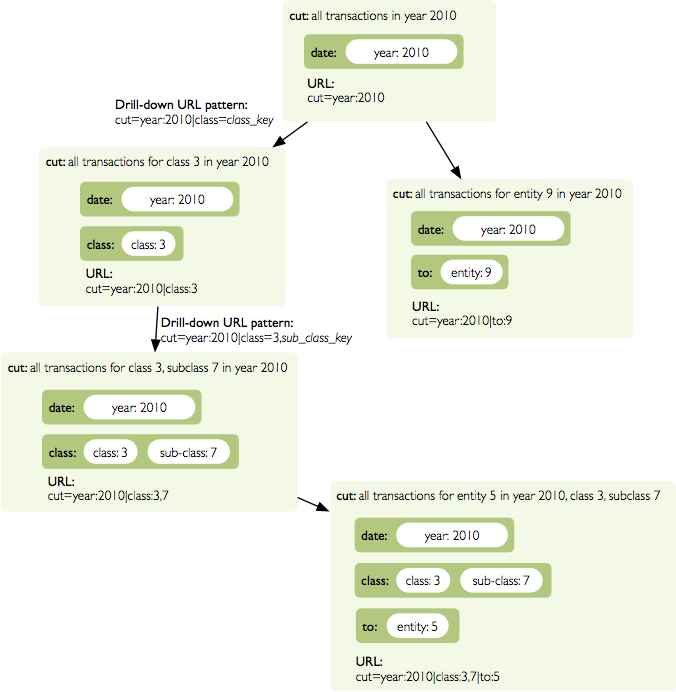
Example of how cuts in URL work and how they should be used in application view templates.
Special Characters
To pass reserved characters as a dimension member path value escape it with the backslash \ character:
- category:10\-24 is a point cut for category with value 10-24, not a range cut
- city:Nové\ Mesto\ nad\ Váhom is a city Nové Mesto nad Váhom
Calendar and Relative Time
If a dimension is a date or time dimension (the dimension role is time) the members can be specified by a name referring to a relative time. For example:
- date:yesterday
- date:90daysago-today – get cell for last 90 days
- expliration_date:lastmonth-next2months – all facts with expiration date within last month (whole) and next 2 months (whole)
- date:yearago – all facts since the same day of the year last year
The keywords and patterns are:
- today, yesterday and tomorrow
- ...ago and ...forward as in 3weeksago (current day minus 3 weeks) and 2monthsforward (current day plus 2 months) – relative offset with fine granularity
- last... and next... as in last3months (beginning of the third month before current month) and nextyear (end of next year) – relative offset of specific (more coarse) granularity.
Aggregate
Request: GET /cube/<cube>/aggregate
Return aggregation result as JSON. The result will contain keys: summary and drilldown. The summary contains one row and represents aggregation of whole cell specified in the cut. The drilldown contains rows for each value of drilled-down dimension.
If no arguments are given, then whole cube is aggregated.
Parameters:
- cut - specification of cell, for example: cut=date:2004,1|category:2|entity:12345
- drilldown - dimension to be drilled down. For example drilldown=date will give rows for each value of next level of dimension date. You can explicitly specify level to drill down in form: dimension:level, such as: drilldown=date:month. To specify a hierarchy use dimension@hierarchy as in drilldown=date@ywd for implicit level or drilldown=date@ywd:week to explicitly specify level.
- aggregates – list of aggregates to be computed, separated by |, for example: aggergates=amount_sum|discount_avg|count
- measures – list of measures for which their respecive aggregates will be computed (see below). Separated by |, for example: aggergates=proce|discount
- page - page number for paginated results
- pagesize - size of a page for paginated results
- order - list of attributes to be ordered by
- split – split cell, same syntax as the cut, defines virtual binary (flag) dimension that inticates whether a cell belongs to the split cut (true) or not (false). The dimension attribute is called __within_split__. Consult the backend you are using for more information, whether this feature is supported or not.
Note
You can specify either aggregates or measures. aggregates is a concrete list of computed values. measures yields their respective aggregates. For example: measures=amount might yield amount_sum and amount_avg if defined in the model.
Use of aggregates is preferred, as it is more explicit and the result is well defined.
Response:
A dictionary with keys:
- summary - dictionary of fields/values for summary aggregation
- cells - list of drilled-down cells with aggregated results
- total_cell_count - number of total cells in drilldown (after limit, before pagination). This value might not be present if it is disabled for computation on the server side.
- aggregates – list of aggregate names that were considered in the aggragation query
- cell - list of dictionaries describing the cell cuts
- levels – a dictionary where keys are dimension names and values is a list of levels the dimension was drilled-down to
Example for request /aggregate?drilldown=date&cut=item:a:
{
    "summary": {
        "count": 32,
        "amount_sum": 558430
    }
    "cells": [
        {
            "count": 16,
            "amount_sum": 275420,
            "date.year": 2009
        },
        {
            "count": 16,
            "amount_sum": 283010,
            "date.year": 2010
        }
    ],
    "aggregates": [
        "amount_sum",
        "count"
    ],
    "total_cell_count": 2,
    "cell": [
        {
            "path": [ "a" ],
            "type": "point",
            "dimension": "item",
            "invert": false,
            "level_depth": 1
        }
    ],
    "levels": { "date": [ "year" ] }
}
If pagination is used, then drilldown will not contain more than pagesize cells.
Note that not all backengs might implement total_cell_count or providing this information can be configurable therefore might be disabled (for example for performance reasons).
Facts
Request: GET /cube/<cube>/facts
Return all facts within a cell.
Parameters:
- cut - see /aggregate
- page, pagesize - paginate results
- order - order results
- format - result format: json (default; see note below), csv or json_lines.
- fields - comma separated list of fact fields, by default all fields are returned
- header – specify what kind of headers should be present in the csv output: names – raw field names (default), labels – human readable labels or none
The JSON response is a list of dictionaries where keys are attribute references (ref property of an attribute).
To use JSON formatted repsonse but don’t have the record limit json_lines format can be used. The result is one fact record in JSON format per line – JSON dictionaries separated by newline n character.
Note
Number of facts in JSON is limited to configuration value of json_record_limit, which is 1000 by default. To get more records, either use pages with size less than record limit or use alternate result format, such as csv.
Single Fact
Request: GET /cube/<cube>/fact/<id>
Get single fact with specified id. For example: /fact/1024.
The response is a dictionary where keys are attribute references (ref property of an attribute).
Dimension members
Request: GET /cube/<cube>/members/<dimension>
Get dimension members used in cube.
Parameters:
cut - see /aggregate
- depth - specify depth (number of levels) to retrieve. If not
specified, then all levels are returned. Use this or level.
level - deepest level to be retrieved – use this or depth.
- hierarchy – name of hierarchy to be considered, if not specified, then
dimension’s default hierarchy is used
page, pagesize - paginate results
order - order results
Response: dictionary with keys dimension – dimension name, depth – level depth and data – list of records.
Example for /cube/facts/members/item?depth=1:
{
    "dimension": "item"
    "depth": 1,
    "hierarchy": "default",
    "data": [
        {
            "item.category": "a",
            "item.category_label": "Assets"
        },
        {
            "item.category": "e",
            "item.category_label": "Equity"
        },
        {
            "item.category": "l",
            "item.category_label": "Liabilities"
        }
    ],
}
Cell
Get details for a cell.
Request: GET /cube/<cube>/cell
Parameters:
- cut - see /aggregate
Response: a dictionary representation of a cell (see cubes.Cell.as_dict()) with keys cube and cuts. cube is cube name and cuts is a list of dictionary representations of cuts.
Each cut is represented as:
{
    // Cut type is one of: "point", "range" or "set"
    "type": cut_type,

    "dimension": cut_dimension_name,
    "level_depth": maximal_depth_of_the_cut,

    // Cut type specific keys.

    // Point cut:
    "path": [ ... ],
    "details": [ ... ]

    // Range cut:
    "from": [ ... ],
    "to": [ ... ],
    "details": { "from": [...], "to": [...] }

    // Set cut:
    "paths": [ [...], [...], ... ],
    "details": [ [...], [...], ... ]
}
Each element of the details path contains dimension attributes for the corresponding level. In addition in contains two more keys: _key and _label which (redundantly) contain values of key attribute and label attribute respectively.
Example for /cell?cut=item:a in the hello_world example:
{
    "cube": "irbd_balance",
    "cuts": [
        {
            "type": "point",
            "dimension": "item",
            "level_depth": 1
            "path": ["a"],
            "details": [
                {
                    "item.category": "a",
                    "item.category_label": "Assets",
                    "_key": "a",
                    "_label": "Assets"
                }
            ],
        }
    ]
}
Report
Request: GET /cube/<cube>/report
Process multiple request within one API call. The data should be a JSON containing report specification where keys are names of queries and values are dictionaries describing the queries.
report expects Content-type header to be set to application/json.
See Report for more information.
Search
Warning
Experimental feature.
Note
Requires a search backend to be installed.
Request: GET /cube/<cube>/search/dimension/<dimension>/<query>
Search values of dimensions for query. If dimension is _all then all dimensions are searched. Returns search results as list of dictionaries with attributes:
| Search result: |
|
|---|
Parameters that can be used in any request:
- prettyprint - if set to true, space indentation is added to the JSON output
Reports
Report queries are done either by specifying a report name in the request URL or using HTTP GET request where posted data are JSON with report specification.
Keys:
- queries - dictionary of named queries
Query specification should contain at least one key: query - which is query type: aggregate, cell_details, values (for dimension values), facts or fact (for multiple or single fact respectively). The rest of keys are query dependent. For more information see AggregationBrowser documentation.
Note
Note that you have to set the content type to application/json.
Result is a dictionary where keys are the query names specified in report specification and values are result values from each query call.
Example report JSON file with two queries:
{
    "queries": {
        "summary": {
            "query": "aggregate"
        },
        "by_year": {
            "query": "aggregate",
            "drilldown": ["date"],
            "rollup": "date"
        }
    }
}
Request:
curl -H "Content-Type: application/json" --data-binary "@report.json" \
    "http://localhost:5000/cube/contracts/report?prettyprint=true&cut=date:2004"
Reply:
{
    "by_year": {
        "total_cell_count": 6,
        "drilldown": [
            {
                "record_count": 4390,
                "requested_amount_sum": 2394804837.56,
                "received_amount_sum": 399136450.0,
                "date.year": "2004"
            },
            ...
            {
                "record_count": 265,
                "requested_amount_sum": 17963333.75,
                "received_amount_sum": 6901530.0,
                "date.year": "2010"
            }
        ],
        "summary": {
            "record_count": 33038,
            "requested_amount_sum": 2412768171.31,
            "received_amount_sum": 2166280591.0
        }
    },
    "summary": {
        "total_cell_count": null,
        "drilldown": {},
        "summary": {
            "date.year": "2004",
            "requested_amount_sum": 2394804837.56,
            "received_amount_sum": 399136450.0,
            "record_count": 4390
        }
    }
}
Explicit specification of a cell (the cuts in the URL parameters are going to be ignored):
{
    "cell": [
        {
            "dimension": "date",
            "type": "range",
            "from": [2010,9],
            "to": [2011,9]
        }
    ],
    "queries": {
        "report": {
            "query": "aggregate",
            "drilldown": {"date":"year"}
        }
    }
}
Roll-up
Report queries might contain rollup specification which will result in “rolling-up” one or more dimensions to desired level. This functionality is provided for cases when you would like to report at higher level of aggregation than the cell you provided is in. It works in similar way as drill down in /aggregate but in the opposite direction (it is like cd .. in a UNIX shell).
Example: You are reporting for year 2010, but you want to have a bar chart with all years. You specify rollup:
...
"rollup": "date",
...
Roll-up can be:
- a string - single dimension to be rolled up one level
- an array - list of dimension names to be rolled-up one level
- a dictionary where keys are dimension names and values are levels to be rolled up-to
Local Server
To run your local server, prepare server Configuration and run the server using the Slicer tool (see slicer - Command Line Tool):
slicer serve slicer.ini
Server requests
Example server request to get aggregate for whole cube:
$ curl http://localhost:5000/cube/procurements/aggregate?cut=date:2004
Reply:
{
    "drilldown": {},
    "summary": {
        "received_amount_sum": 399136450.0,
        "requested_amount_sum": 2394804837.56,
        "record_count": 4390
    }
}